Build multi-step applications and AI workflows with AWS Lambda durable functions
Modern applications increasingly require complex and long-running coordination between services, such as multi-step payment processing, AI agent orchestration, or approval processes awaiting human decisions. Building these traditionally required significant effort to implement state management, handle failures, and integrate multiple infrastructure services.
Starting today, you can use AWS Lambda durable functions to build reliable multi-step applications directly within the familiar AWS Lambda experience. Durable functions are regular Lambda functions with the same event handler and integrations you already know. You write sequential code in your preferred programming language, and durable functions track progress, automatically retry on failures, and suspend execution for up to one year at defined points, without paying for idle compute during waits.
AWS Lambda durable functions use a checkpoint and replay mechanism, known as durable execution, to deliver these capabilities. After enabling a function for durable execution, you add the new open source durable execution SDK to your function code. You then use SDK primitives like “steps” to add automatic checkpointing and retries to your business logic and “waits” to efficiently suspend execution without compute charges. When execution terminates unexpectedly, Lambda resumes from the last checkpoint, replaying your event handler from the beginning while skipping completed operations.
Getting started with AWS Lambda durable functions
Let me walk you through how to use durable functions.
First, I create a new Lambda function in the console and select Author from scratch. In the Durable execution section, I select Enable. Note that, durable function setting can only be set during function creation and currently can’t be modified for existing Lambda functions.

After I create my Lambda durable function, I can get started with the provided code.
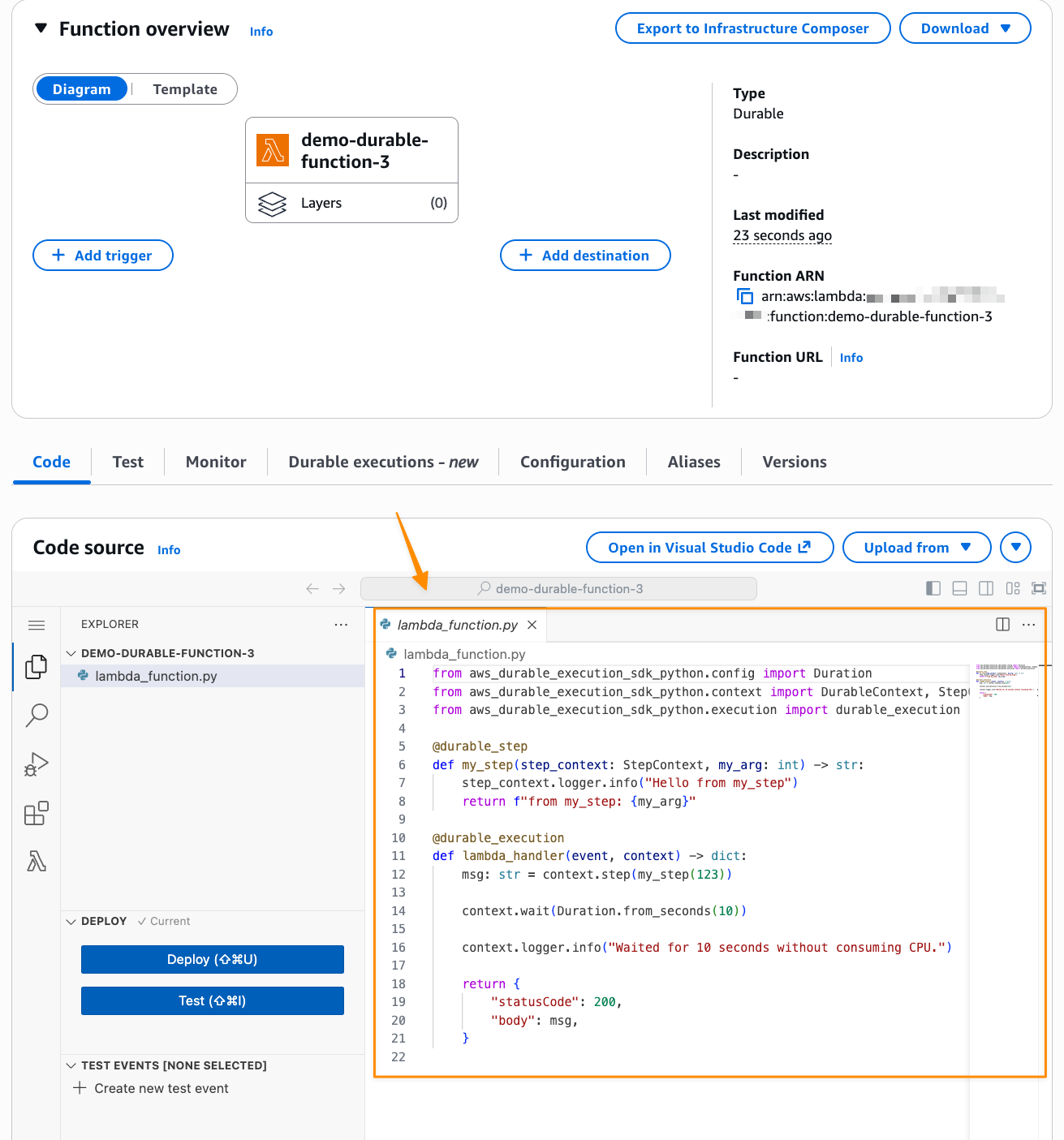
Lambda durable functions introduces two core primitives that handle state management and recovery:
- Steps—The
context.step()method adds automatic retries and checkpointing to your business logic. After a step is completed, it will be skipped during replay. - Wait—The
context.wait()method pauses execution for a specified duration, terminating the function, suspending and resuming execution without compute charges.
Additionally, Lambda durable functions provides other operations for more complex patterns: create_callback() creates a callback that you can use to await results for external events like API responses or human approvals, wait_for_condition() pauses until a specific condition is met like polling a REST API for process completion, and parallel() or map() operations for advanced concurrency use cases.
Building a production-ready order processing workflow
Now let’s expand the default example to build a production-ready order processing workflow. This demonstrates how to use callbacks for external approvals, handle errors properly, and configure retry strategies. I keep the code intentionally concise to focus on these core concepts. In a full implementation, you could enhance the validation step with Amazon Bedrock to add AI-powered order analysis.
Here’s how the order processing workflow works:
- First,
validate_order()checks order data to ensure all required fields are present. - Next,
send_for_approval()sends the order for external human approval and waits for a callback response, suspending execution without compute charges. - Then,
process_order()completes order processing. - Throughout the workflow, try-catch error handling distinguishes between terminal errors that stop execution immediately and recoverable errors inside steps that trigger automatic retries.
Here’s the complete order processing workflow with step definitions and the main handler:
import random
from aws_durable_execution_sdk_python import (
    DurableContext,
    StepContext,
    durable_execution,
    durable_step,
)
from aws_durable_execution_sdk_python.config import (
    Duration,
    StepConfig,
    CallbackConfig,
)
from aws_durable_execution_sdk_python.retries import (
    RetryStrategyConfig,
    create_retry_strategy,
)


@durable_step
def validate_order(step_context: StepContext, order_id: str) -> dict:
    """Validates order data using AI."""
    step_context.logger.info(f"Validating order: {order_id}")
    # In production: calls Amazon Bedrock to validate order completeness and accuracy
    return {"order_id": order_id, "status": "validated"}


@durable_step
def send_for_approval(step_context: StepContext, callback_id: str, order_id: str) -> dict:
    """Sends order for approval using the provided callback token."""
    step_context.logger.info(f"Sending order {order_id} for approval with callback_id: {callback_id}")

    # In production: send callback_id to external approval system
    # The external system will call Lambda SendDurableExecutionCallbackSuccess or
    # SendDurableExecutionCallbackFailure APIs with this callback_id when approval is complete

    return {
        "order_id": order_id,
        "callback_id": callback_id,
        "status": "sent_for_approval"
    }


@durable_step
def process_order(step_context: StepContext, order_id: str) -> dict:
    """Processes the order with retry logic for transient failures."""
    step_context.logger.info(f"Processing order: {order_id}")
    # Simulate flaky API that sometimes fails
    if random.random() > 0.4:
        step_context.logger.info("Processing failed, will retry")
        raise Exception("Processing failed")
    return {
        "order_id": order_id,
        "status": "processed",
        "timestamp": "2025-11-27T10:00:00Z",
    }


@durable_execution
def lambda_handler(event: dict, context: DurableContext) -> dict:
    try:
        order_id = event.get("order_id")

        # Step 1: Validate the order
        validated = context.step(validate_order(order_id))
        if validated["status"] != "validated":
            raise Exception("Validation failed")  # Terminal error - stops execution
        context.logger.info(f"Order validated: {validated}")

        # Step 2: Create callback
        callback = context.create_callback(
            name="awaiting-approval",
            config=CallbackConfig(timeout=Duration.from_minutes(3))
        )
        context.logger.info(f"Created callback with id: {callback.callback_id}")

        # Step 3: Send for approval with the callback_id
        approval_request = context.step(send_for_approval(callback.callback_id, order_id))
        context.logger.info(f"Approval request sent: {approval_request}")

        # Step 4: Wait for the callback result
        # This blocks until external system calls SendDurableExecutionCallbackSuccess or SendDurableExecutionCallbackFailure
        approval_result = callback.result()
        context.logger.info(f"Approval received: {approval_result}")

        # Step 5: Process the order with custom retry strategy
        retry_config = RetryStrategyConfig(max_attempts=3, backoff_rate=2.0)
        processed = context.step(
            process_order(order_id),
            config=StepConfig(retry_strategy=create_retry_strategy(retry_config)),
        )
        if processed["status"] != "processed":
            raise Exception("Processing failed")  # Terminal error

        context.logger.info(f"Order successfully processed: {processed}")
        return processed

    except Exception as error:
        context.logger.error(f"Error processing order: {error}")
        raise error  # Re-raise to fail the execution
This code demonstrates several important concepts:
- Error handling—The try-catch block handles terminal errors. When an unhandled exception is thrown outside of a step (like the validation check), it terminates the execution immediately. This is useful when there’s no point in retrying, such as invalid order data.
- Step retries—Inside the
process_orderstep, exceptions trigger automatic retries based on the default (step 1) or configuredRetryStrategy(step 5). This handles transient failures like temporary API unavailability. - Logging—I use
context.loggerfor the main handler andstep_context.loggerinside steps. The context logger suppresses duplicate logs during replay.
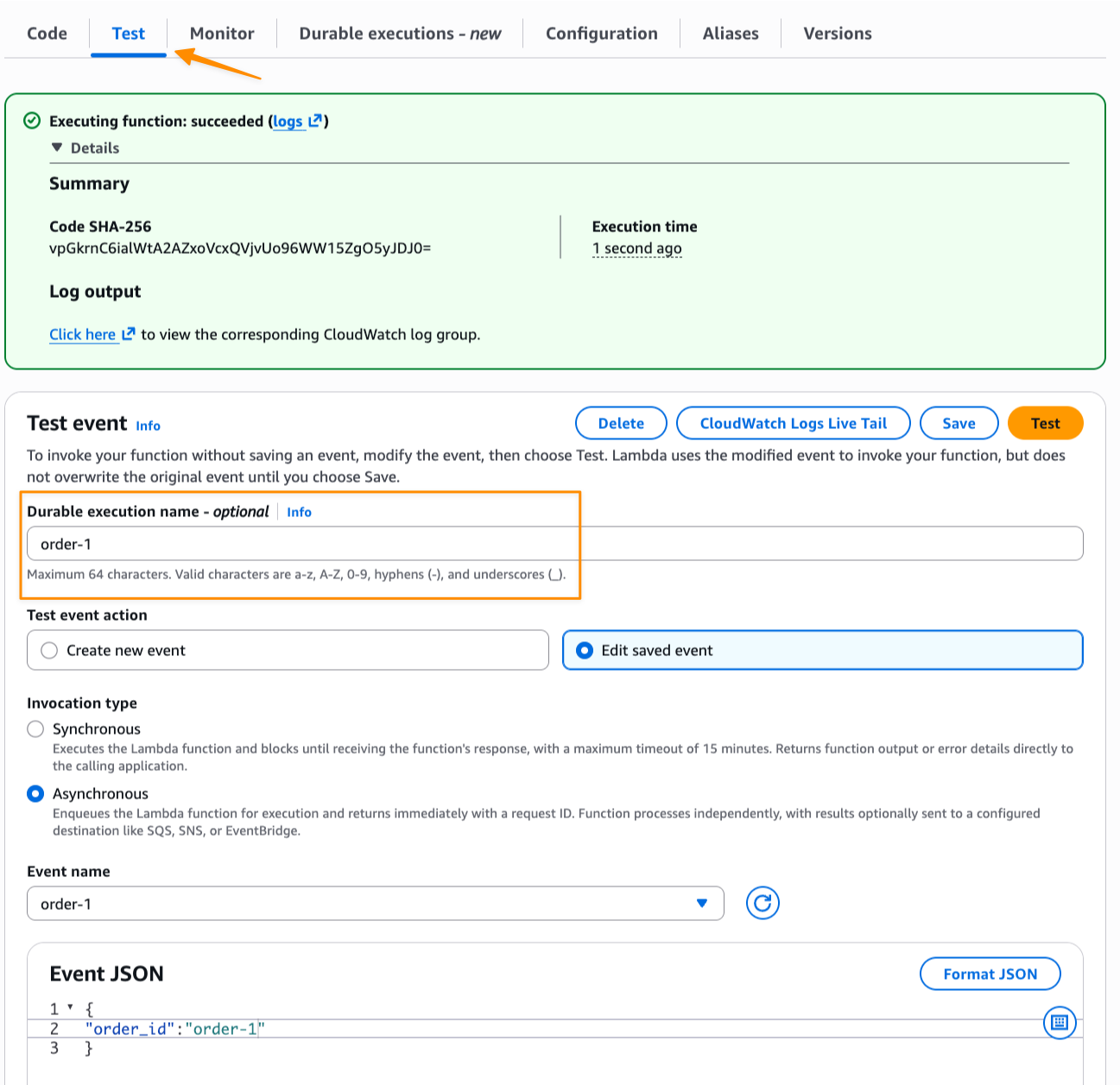
Now I create a test event with order_id and invoke the function asynchronously to start the order workflow. I navigate to the Test tab and fill in the optional Durable execution name to identify this execution. Note that, durable functions provides built-in idempotency. If I invoke the function twice with the same execution name, the second invocation returns the existing execution result instead of creating a duplicate.
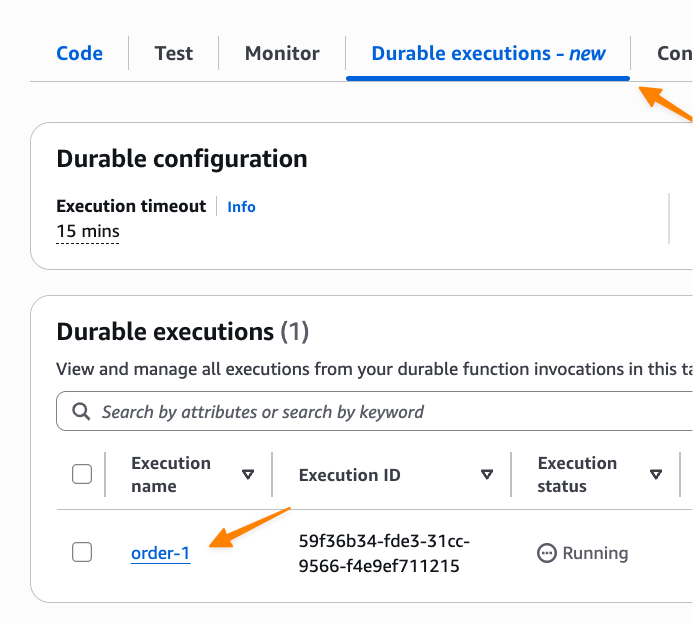
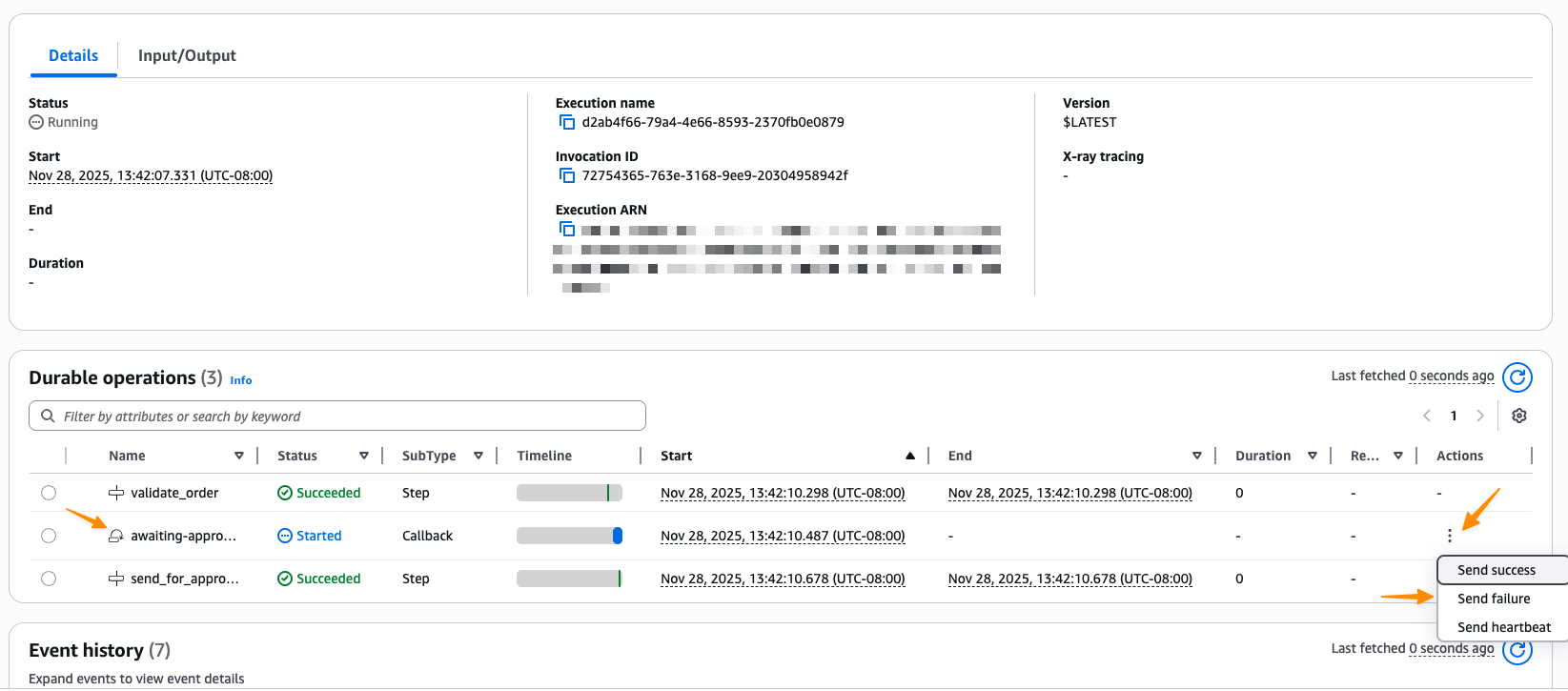
I can monitor the execution by navigating to the Durable executions tab in the Lambda console:
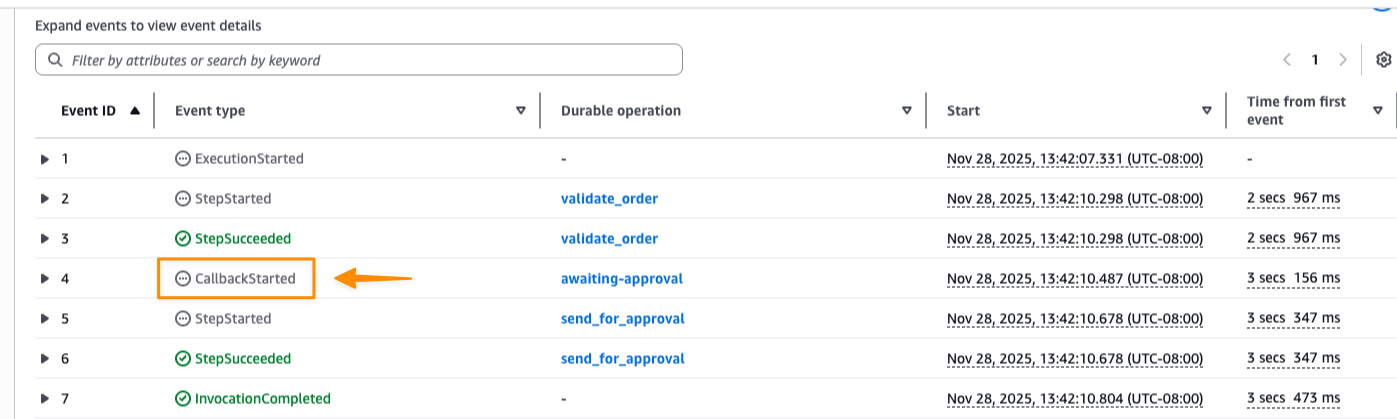
Here I can see each step’s status and timing. The execution shows CallbackStarted followed by InvocationCompleted, which indicates the function has terminated and execution is suspended to avoid idle charges while waiting for the approval callback.
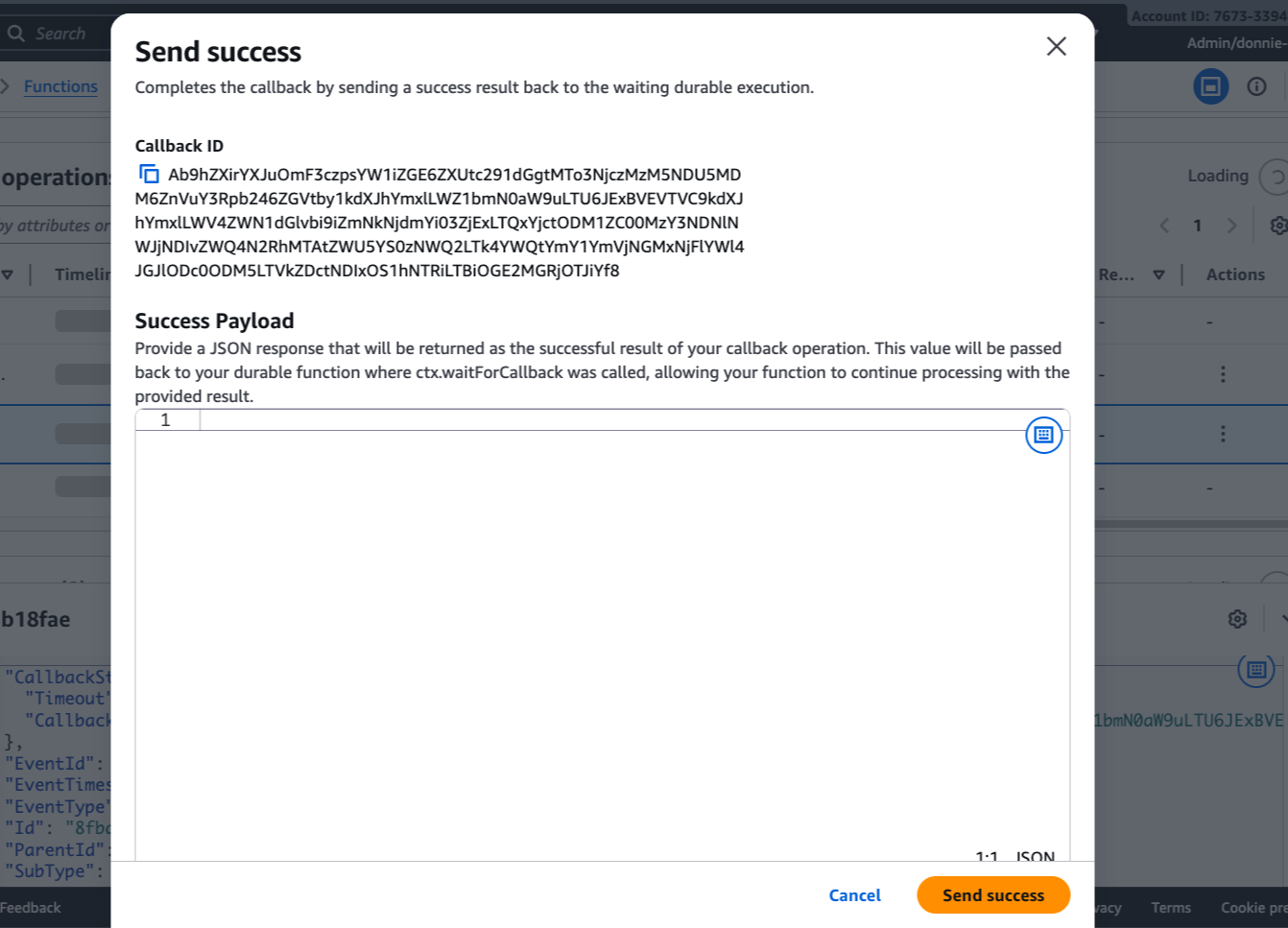
I can now complete the callback directly from the console by choosing Send success or Send failure, or programmatically using the Lambda API.
I choose Send success.
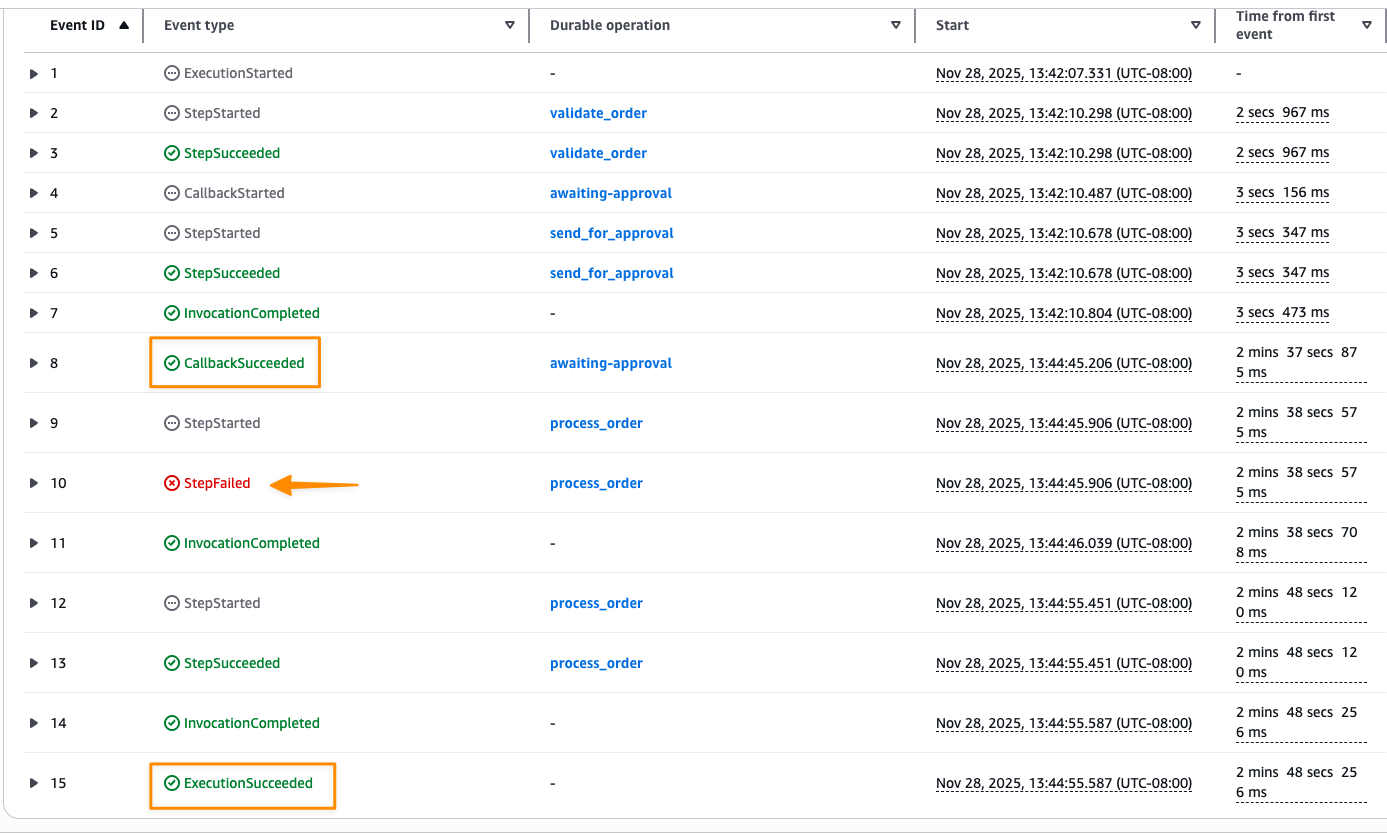
After the callback completes, the execution resumes and processes the order. If the process_order step fails due to the simulated flaky API, it automatically retries based on the configured strategy. Once all retries succeed, the execution completes successfully.
Monitoring executions with Amazon EventBridge
You can also monitor durable function executions using Amazon EventBridge. Lambda automatically sends execution status change events to the default event bus, allowing you to build downstream workflows, send notifications, or integrate with other AWS services.
To receive these events, create an EventBridge rule on the default event bus with this pattern:
{
  "source": ["aws.lambda"],
  "detail-type": ["Durable Execution Status Change"]
}
Things to know
Here are key points to note:
- Availability—Lambda durable functions are now available in US East (Ohio) AWS Region. For the latest Region availability, visit the AWS Capabilities by Region page.
- Programming language support—At launch, AWS Lambda durable functions supports JavaScript/TypeScript (Node.js 22/24) and Python (3.13/3.14). We recommend bundling the durable execution SDK with your function code using your preferred package manager. The SDKs are fast-moving, so you can easily update dependencies as new features become available.
- Using Lambda versions—When deploying durable functions to production, use Lambda versions to ensure replay always happens on the same code version. If you update your function code while an execution is suspended, replay will use the version that started the execution, preventing inconsistencies from code changes during long-running workflows.
- Testing your durable functions—You can test durable functions locally without AWS credentials using the separate testing SDK with pytest integration and the AWS Serverless Application Model (AWS SAM) command line interface (CLI) for more complex integration testing.
- Open source SDKs—The durable execution SDKs are open source for JavaScript/TypeScript and Python. You can review the source code, contribute improvements, and stay updated with the latest features.
- Pricing—To learn more on AWS Lambda durable functions pricing, refer to the AWS Lambda pricing page.
Get started with AWS Lambda durable functions by visiting the AWS Lambda console. To learn more, refer to AWS Lambda durable functions documentation page.
Happy building!
— Donnie
Source: AWS News